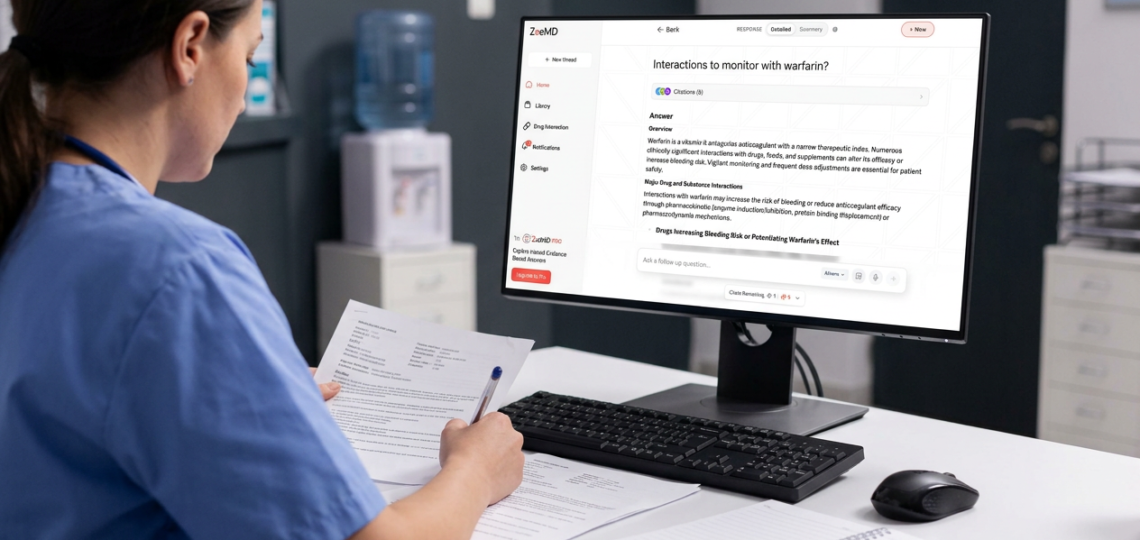
What Is Clinical Decision Support and How Does It Work?
Clinical decision support is software built into a clinician’s daily workflow that analyzes patient data and offers timely, relevant guidance at the exact moment a decision needs to be made. It might flag a dangerous drug interaction before a prescription is signed, suggest a missing lab test based on a patient’s symptoms, or highlight a treatment guideline that applies to the case in front of the clinician. Rather than replacing a doctor’s judgment, it acts as a second set of eyes that never gets tired and never forgets a rule buried deep in a guideline document.
A Simple Definition of Clinical Decision Support
A clinical decision support system, often shortened to CDSS, is a piece of health software designed to match an individual patient’s characteristics against a knowledge base of clinical rules, guidelines, and research, then present a tailored recommendation back to the clinician. That knowledge base might include drug interaction databases, disease specific protocols, dosing calculators, or alerts built from an institution’s own internal data.
These systems have existed in some form since the 1970s, but early versions were clunky, slow, and separate from the tools doctors actually used every day. Modern systems are built directly into electronic health record platforms, which means the guidance appears automatically as a clinician documents a visit, orders a test, or writes a prescription, without requiring a separate login or a search through a different application.
The Two Broad Categories of These Systems
Most tools in this space fall into one of two general categories, each suited to different kinds of clinical questions.
- Knowledge based systems: these rely on a structured set of rules built by human experts, such as if a patient is prescribed drug A while already taking drug B, generate an alert.
- Non knowledge based systems: these use machine learning and pattern recognition trained on large volumes of patient data to spot risks or suggest actions that were not explicitly programmed as fixed rules.
How These Systems Fit Into a Clinician’s Actual Workflow
The value of this technology depends entirely on timing. A brilliant recommendation delivered after a patient has already left the building is far less useful than a simple alert delivered at the moment a prescription is being typed. Well designed systems are built to interrupt the workflow only when necessary, since alert fatigue, where clinicians start ignoring warnings because there are simply too many of them, is one of the biggest risks in this field.
- During order entry, flagging duplicate tests, incorrect dosing, or dangerous drug combinations.
- During documentation, suggesting a diagnosis code or a missing piece of patient history based on symptoms already entered.
- During diagnosis, surfacing relevant guidelines or differential diagnoses that match the patient’s presenting symptoms.
- During follow up, reminding a care team about overdue screenings or preventive care that a patient is due for.
Why These Alerts Actually Improve Patient Safety
Human memory has real limits, and no clinician can be expected to remember every drug interaction, every updated dosing guideline, or every subtle warning sign across thousands of patients seen over a career. Software does not have that limitation. It can cross reference a patient’s full medication list, allergy history, and lab results in a fraction of a second, catching combinations a busy clinician might reasonably miss during a packed clinic day.
Common Types of Alerts and Recommendations
These systems generate several recurring types of guidance across most healthcare settings.
- Drug interaction and allergy alerts.
- Dosing recommendations adjusted for kidney function, weight, or age.
- Duplicate order warnings to prevent unnecessary repeat testing.
- Preventive care reminders, such as overdue vaccinations or cancer screenings.
- Guideline based recommendations tied to a specific diagnosis, such as sepsis or stroke protocols.
The Challenges That Come With This Technology
No system is perfect, and this technology brings its own set of well documented problems. Alert fatigue remains the most persistent issue, since a system that fires too many low value warnings trains clinicians to click through them without reading. Poorly maintained knowledge bases can also generate outdated or irrelevant advice if the underlying rules are not regularly updated alongside new research. Integration with existing electronic health records can be technically difficult, and systems that feel clunky or slow tend to get abandoned quickly regardless of how accurate their recommendations are.
Where This Technology Is Headed
The next generation of these tools leans heavily on artificial intelligence to move beyond simple rule based alerts toward predictive guidance, flagging a patient at risk of a complication before obvious symptoms appear. Platforms like Zoemed sit at this intersection, aiming to combine current medical evidence with a patient’s specific data in a way that feels fast and unobtrusive rather than like one more system to fight against during a busy shift.
How These Systems Are Built and Maintained
Behind every alert a clinician sees sits a team responsible for keeping the underlying knowledge base current. This usually involves clinical informaticists, pharmacists, and practicing physicians who review new research, updated drug labeling, and revised professional guidelines, then translate that information into rules the software can actually apply. This maintenance work is unglamorous but absolutely essential, since a system running on outdated rules can do more harm than having no system at all by giving clinicians false confidence in advice that no longer reflects current best practice.
Most institutions also run a governance committee that reviews how alerts are performing in the real world, tracking how often a given warning is overridden and why. If a particular alert is being dismissed by clinicians the vast majority of the time, that is usually a signal the rule needs to be refined rather than evidence that the warning should simply be ignored more often. This continuous feedback loop is what separates a genuinely useful system from one that quietly becomes background noise.
Who Uses This Technology Beyond Physicians
While physicians are the most visible users, this technology touches nearly every role in a modern care setting. Pharmacists rely on it to catch interaction risks before a prescription is filled, nurses use it to flag early warning signs during routine vital sign checks, and care coordinators lean on automated reminders to keep patients with chronic conditions on schedule for follow up visits. This broad reach is part of why implementation across a large hospital system takes real planning, since the tool needs to serve very different workflows without becoming a burden to any single group.
What Sets a Strong System Apart From a Weak One
Not every implementation delivers the same value, and the difference usually comes down to a few practical qualities rather than flashy features. A strong system fires alerts sparingly and only when the situation genuinely calls for clinician attention, keeps its underlying rules current with the latest research and guideline updates, and integrates smoothly enough into the existing electronic record that clinicians barely notice it working in the background until the exact moment they need it. A weak system does the opposite, firing constant low value warnings, running on stale rules, and requiring extra clicks or a separate login that quickly gets skipped during a busy shift.
Healthcare organizations evaluating new platforms often run a pilot phase in a single department before rolling a system out more broadly, using that trial period to measure alert override rates, staff satisfaction, and any measurable change in error rates. This cautious approach helps avoid the common mistake of investing heavily in a system that looks impressive in a sales demonstration but does not hold up once it meets the reality of a busy emergency department or a packed outpatient clinic schedule.
Frequently Asked Questions
What is an example of clinical decision support in everyday practice?
A common example is a pop up alert that appears when a physician orders a medication that conflicts with something else the patient is already taking, or a reminder that a diabetic patient is overdue for an annual eye exam based on their chart history.
Is clinical decision support the same as an electronic health record?
No. An electronic health record stores and organizes patient information, while clinical decision support is a layer of intelligence built on top of that data, analyzing it and offering recommendations rather than simply storing it.
Does this technology replace a doctor’s judgment?
No, it is designed to support judgment rather than replace it. The final decision always rests with the clinician, who can accept, modify, or override a system generated recommendation based on the full clinical picture.
What is alert fatigue and why does it matter?
Alert fatigue happens when clinicians are shown so many low value warnings that they begin dismissing alerts automatically without reading them closely. It matters because it can cause truly important warnings to be missed, which is why well designed systems limit alerts to genuinely actionable situations.
Who is responsible for keeping the recommendations up to date?
Most healthcare organizations assign this task to a governance team made up of clinical informaticists, pharmacists, and practicing clinicians who review new research and guideline updates on an ongoing basis and translate them into rules the software can apply.